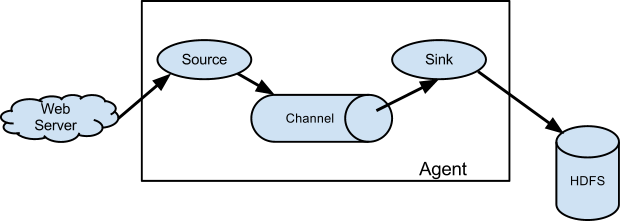
In the following tutorial, we will begin with a very simple flume agent that comprise of:
1. Source: NetCat as Source (org.apache.flume.source.NetcatSource)
2.Channel: Memory Channel (org.apache.flume.channel.MemoryChannel)
3.Sink: Logger Sink (org apache flume sink LoggerSink), useful for testing/debugging purpose
Here, the netcat command will act as the actual source of data which will ingest data to the NetCat Source within the agent and store in the intermediate channel i.e. Memory and log all the events to the Logger Sink.
P.S: The ‘netcat’ command opens the connection between two machines and listen to the stream. In our case we would be having a localhost only and stream would be the event (one line per text).
Let’s start by following:
1. Create a conf file ‘myflume.conf’ under conf directory:
agent.sources=s1
agent.channels=c1
agent.sinks=k1
agent.sources.s1.type=netcat
agent.sources.s1.channels=c1
agent.sources.s1.bind=0.0.0.0
agent.sources.s1.port=12345
agent.channels.c1.type=memory
agent.sinks.k1.type=logger
agent.sinks.k1.channel=c1
2. Run the flume-ng command:
ubuntu-vb@ubuntu-vb:~/hadoop_repo/flume/flume152$ flume-ng agent -n agent -c conf -f conf/myflume.conf -Dflume.root.logger=INFO,console
+ exec /usr/lib/jvm/java-7-oracle/bin/java -Xmx20m -Dflume.root.logger=INFO,console -cp ‘/home/ubuntu-vb/hadoop_repo/flume/flume152/conf:/home/ubuntu-vb/hadoop_repo/flume/flume152/lib/*’ -Djava.library.path= org.apache.flume.node.Application -n agent -f conf/hw.conf
2015-05-10 15:15:01,500 (lifecycleSupervisor-1-0) [INFO – org.apache.flume.node.PollingPropertiesFileConfigurationProvider.start(PollingPropertiesFileConfigurationProvider.java:61)] Configuration provider starting
2015-05-10 15:15:01,514 (conf-file-poller-0) [INFO – org.apache.flume.node.PollingPropertiesFileConfigurationProvider$FileWatcherRunnable.run(PollingPropertiesFileConfigurationProvider.java:133)] Reloading configuration file:conf/hw.conf
2015-05-10 15:15:01,573 (conf-file-poller-0) [INFO – org.apache.flume.conf.FlumeConfiguration$AgentConfiguration.addProperty(FlumeConfiguration.java:1016)] Processing:k1
2015-05-10 15:15:01,590 (conf-file-poller-0) [INFO – org.apache.flume.conf.FlumeConfiguration$AgentConfiguration.addProperty(FlumeConfiguration.java:930)] Added sinks: k1 Agent: agent
2015-05-10 15:15:01,598 (conf-file-poller-0) [INFO – org.apache.flume.conf.FlumeConfiguration$AgentConfiguration.addProperty(FlumeConfiguration.java:1016)] Processing:k1
2015-05-10 15:15:01,674 (conf-file-poller-0) [INFO – org.apache.flume.conf.FlumeConfiguration.validateConfiguration(FlumeConfiguration.java:140)] Post-validation flume configuration contains configuration for agents: [agent]
2015-05-10 15:15:01,675 (conf-file-poller-0) [INFO – org.apache.flume.node.AbstractConfigurationProvider.loadChannels(AbstractConfigurationProvider.java:150)] Creating channels
2015-05-10 15:15:01,699 (conf-file-poller-0) [INFO – org.apache.flume.channel.DefaultChannelFactory.create(DefaultChannelFactory.java:40)] Creating instance of channel c1 type memory
2015-05-10 15:15:01,726 (conf-file-poller-0) [INFO – org.apache.flume.node.AbstractConfigurationProvider.loadChannels(AbstractConfigurationProvider.java:205)] Created channel c1
2015-05-10 15:15:01,749 (conf-file-poller-0) [INFO – org.apache.flume.source.DefaultSourceFactory.create(DefaultSourceFactory.java:39)] Creating instance of source s1, type netcat
2015-05-10 15:15:01,814 (conf-file-poller-0) [INFO – org.apache.flume.sink.DefaultSinkFactory.create(DefaultSinkFactory.java:40)] Creating instance of sink: k1, type: logger
2015-05-10 15:15:01,822 (conf-file-poller-0) [INFO – org.apache.flume.node.AbstractConfigurationProvider.getConfiguration(AbstractConfigurationProvider.java:119)] Channel c1 connected to [s1, k1]
2015-05-10 15:15:01,939 (conf-file-poller-0) [INFO – org.apache.flume.node.Application.startAllComponents(Application.java:138)] Starting new configuration:{ sourceRunners:{s1=EventDrivenSourceRunner: { source:org.apache.flume.source.NetcatSource{name:s1,state:IDLE} }} sinkRunners:{k1=SinkRunner: { policy:org.apache.flume.sink.DefaultSinkProcessor@1b620a2 counterGroup:{ name:null counters:{} } }} channels:{c1=org.apache.flume.channel.MemoryChannel{name: c1}} }
2015-05-10 15:15:02,029 (conf-file-poller-0) [INFO – org.apache.flume.node.Application.startAllComponents(Application.java:145)] Starting Channel c1
2015-05-10 15:15:02,424 (lifecycleSupervisor-1-0) [INFO – org.apache.flume.instrumentation.MonitoredCounterGroup.register(MonitoredCounterGroup.java:119)] Monitored counter group for type: CHANNEL, name: c1: Successfully registered new MBean.
2015-05-10 15:15:02,430 (lifecycleSupervisor-1-0) [INFO – org.apache.flume.instrumentation.MonitoredCounterGroup.start(MonitoredCounterGroup.java:95)] Component type: CHANNEL, name: c1 started
2015-05-10 15:15:02,441 (conf-file-poller-0) [INFO – org.apache.flume.node.Application.startAllComponents(Application.java:173)] Starting Sink k1
2015-05-10 15:15:02,490 (conf-file-poller-0) [INFO – org.apache.flume.node.Application.startAllComponents(Application.java:184)] Starting Source s1
2015-05-10 15:15:02,502 (lifecycleSupervisor-1-2) [INFO – org.apache.flume.source.NetcatSource.start(NetcatSource.java:150)] Source starting
2015-05-10 15:15:02,660 (lifecycleSupervisor-1-2) [INFO – org.apache.flume.source.NetcatSource.start(NetcatSource.java:164)] Created serverSocket:sun.nio.ch.ServerSocketChannelImpl[/0:0:0:0:0:0:0:0:12345]
3. Open another terminal and type
ubuntu-vb@ubuntu-vb:~/hadoop_repo/flume/flume152$ nc localhost 12345
Hello Flume
OK
4. Now see at the earlier terminal
2015-05-10 15:18:36,762 (SinkRunner-PollingRunner-DefaultSinkProcessor) [INFO – org.apache.flume.sink.LoggerSink.process(LoggerSink.java:70)] Event: { headers:{} body: 48 65 6C 6C 6F 20 46 6C 75 6D 65 Hello Flume }
Here, it indicates the source from agent has accepted text string as an event , when sent from ‘nc’ command as an source of event, gone into memory channel and logged on the Sink i.e. as a log4j logger
 amp_stack